- Apps
- Premium
-
VPN Locations
- Help
- Sign up
- Sign in
What iCloud Private Relay Does for You, and Where a VPN Comes in
Contents
iCloud Private Relay hides your IP address from the websites you open in Safari, and it hides which sites you open from the network you're on. It comes with iCloud+, and it isn't a VPN: it covers less traffic, gives you no say over your location, and can't make a site think you're somewhere else. If you already pay for iCloud+, leave it on. You may still want a VPN next to it.
What iCloud Private Relay is and who gets it
Private Relay is a privacy feature Apple includes with an iCloud+ subscription. It needs iOS 15, iPadOS 15 or macOS Monterey (macOS 12) or later, according to Apple's Private Relay overview, a PDF from December 2021. On an iPhone or iPad you switch it on under Settings, your name, iCloud, Private Relay. On a Mac it sits in the same iCloud settings.
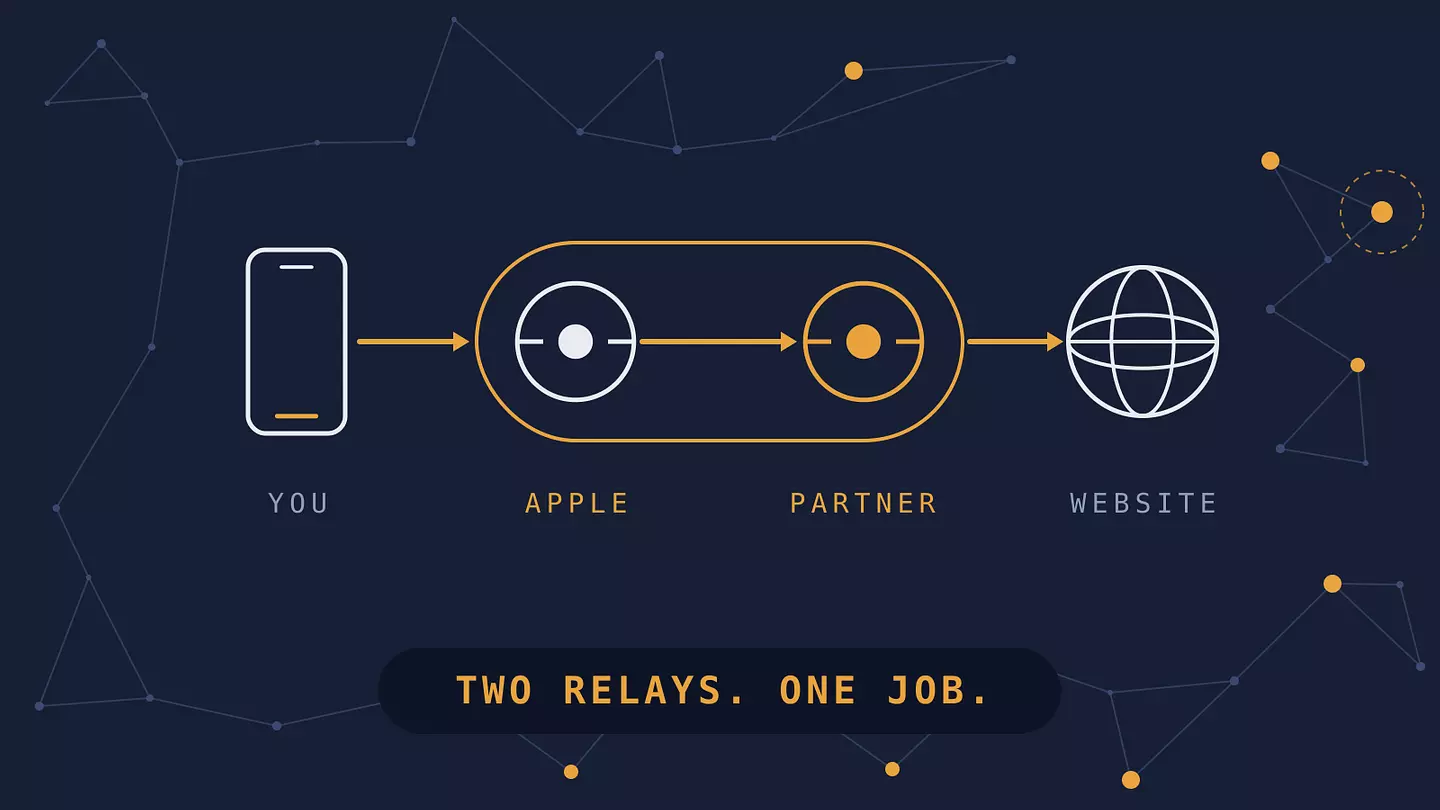
The job is narrow. When you browse in Safari, Apple's support page says your requests travel through two separate relays, so no single party, Apple included, can see both who you are and which sites you visit. The site you open gets a temporary IP address instead of yours. Some sites may ask for an extra sign-in step, Apple says.
How the two relays split what they know
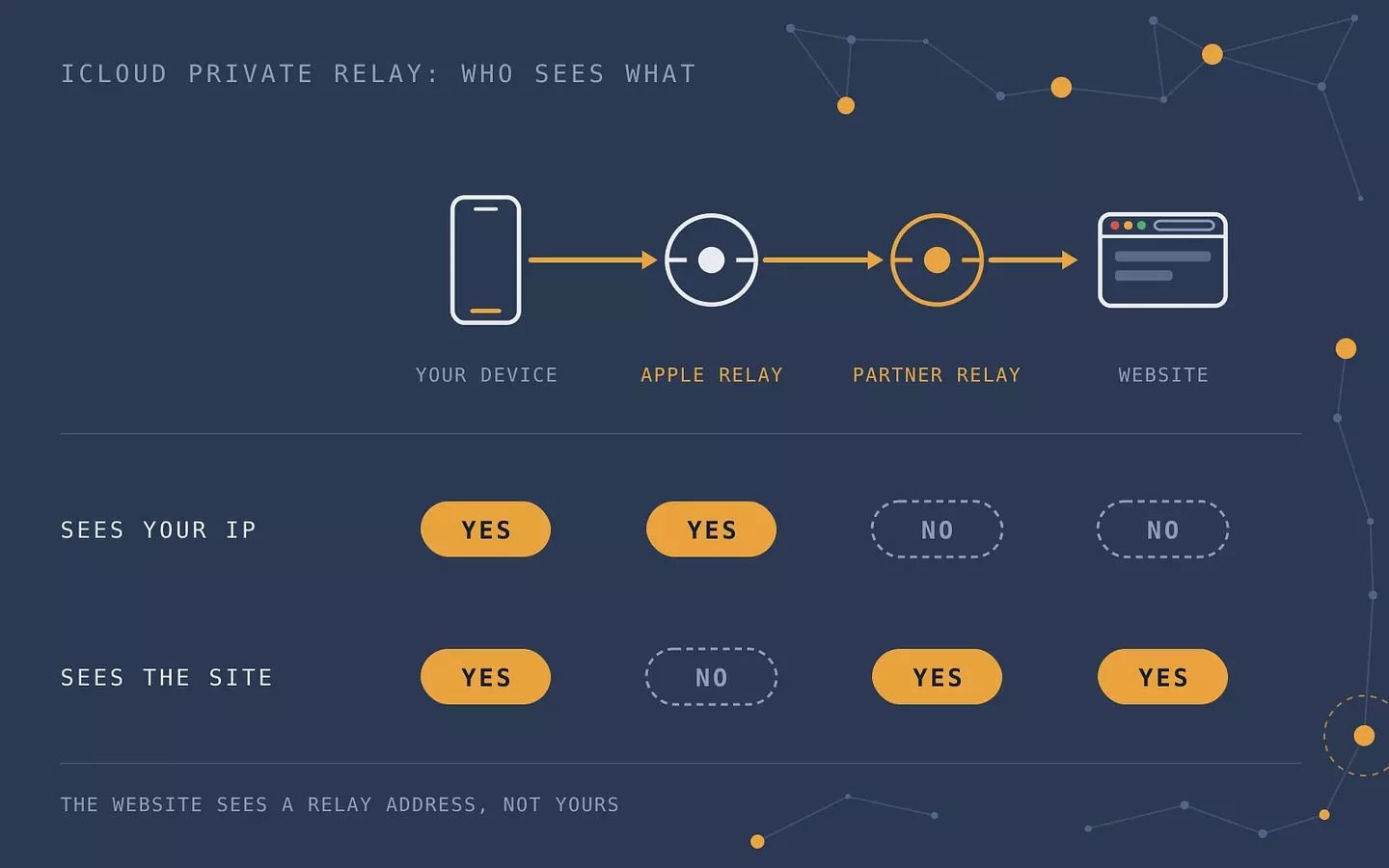
Your traffic takes two hops instead of one. Apple runs the first relay. It sees your real IP address and the network you're connected through (your ISP or mobile carrier, say). The website name is encrypted, so it can't read it. A partner runs the second relay. It decrypts the site name, gives you a temporary IP address and connects you to the site. It never learns your original address, per Apple's overview.
The party that knows you doesn't know where you're going, and the party that knows where you're going doesn't know you. It's the reverse of the usual setup, where what a Wi-Fi owner can see includes the domains you visit.
Who | Sees your IP address | Sees which site you visit |
|---|---|---|
Your network (Wi-Fi owner, ISP, carrier) | Yes | No |
Apple's first relay | Yes | No |
The partner's second relay | No | Yes |
The website | No, it sees a relay address | Yes |
Apple describes the second-hop operators only as some of the world's largest content delivery networks. A 2023 APNIC study that measured the relay network found Akamai, Cloudflare and Fastly running the second relay. If a two-hop design sounds like a pair of chained proxies, that's close to what it is, and how proxies compare to VPNs explains why that still isn't the same as a VPN.
What it covers and what it skips
Apple's overview splits coverage into three parts: all browsing in Safari, DNS lookups (the step where your device asks for a site's address), and unencrypted traffic from apps. DNS goes through an encrypted protocol, Oblivious DNS over HTTPS, so the lookup can't be tied back to you either.
The list of exceptions is short. Apple's overview says Private Relay leaves out servers on your local or private network, cellular services such as MMS, tethering and Visual Voicemail, and any traffic that goes through a VPN. Custom encrypted DNS settings also replace Private Relay's own DNS handling.
An app's encrypted traffic isn't on Apple's list of what Private Relay covers, and Apple's description doesn't extend to other browsers either, so assume Chrome and Firefox connect the normal way, with your real IP address. Private Relay also exists only on Apple devices, so there's nothing for a Windows laptop or an Android phone. If most of your browsing happens outside Safari, it protects far less of your day than the name suggests.
Why you can't pick a country
Private Relay gives you two choices, under IP address location. "Maintain general location" keeps your relay address in a roughly city-sized area around you, so sites can still show local results. "Use country and time zone" widens that, and sites only learn your country and time zone. Either way, the address still maps to your own country and time zone, as Apple's overview describes (December 2021).
There's no country list to choose from. That's the practical gap with a VPN: Private Relay can't make a streaming service think you're abroad, and it isn't built to.
When Private Relay doesn't work
Three things switch it off: where you are, which network you're on, and what's running on your device. Apple says you get a notice when Private Relay becomes unavailable, and another when it's back.
Countries where it's unavailable
Apple's support pages only say Private Relay isn't available in all countries or regions. The page to check is Apple's feature availability list, which names 160 countries and regions where it works. Anything missing doesn't have it. On November 10, 2026, China mainland, Russia, Saudi Arabia, Türkiye, Egypt, Belarus and South Africa were missing from that list, while the US, the UK, Germany and India were on it.
If you travel somewhere that isn't listed, Private Relay turns itself off and comes back when you reach a supported country or region, according to Apple's page on managing Private Relay.
Networks that block it
Some networks refuse Private Relay on purpose. Apple says business and school networks may block it because they need to audit or filter traffic, and services that rely on seeing your browsing, such as parental controls, can interfere too. Sites that depend on IP filtering or rate limiting may also block you while it's on.
That's the situation behind the Wi-Fi alert "Private Relay is turned off for this network." Apple's page describes the situation without quoting the alert, so the wording can vary by iOS version. The alert means the network can't or won't carry Private Relay traffic.
Turning it off for one network
You don't have to turn Private Relay off everywhere. The per-network switch is called Limit IP Address Tracking, and Apple says it applies to all your devices that use Private Relay.
On an iPhone or iPad, open Settings, then Wi-Fi.
Tap the info button next to the network and scroll down.
Turn off Limit IP Address Tracking.
On a Mac (Ventura or later), go to System Settings, then Network, pick Wi-Fi, click Details next to the network and turn off Limit IP address tracking. For a cellular plan, open that plan's settings under Settings and use the same toggle. To let one site see your real address, use Show IP Address in Safari's page menu. Apple warns that your network provider can then see which site you open.
My advice: leave Private Relay on, and turn it off for a single network or site only when that network or site breaks.
Is iCloud Private Relay a VPN?
No. A VPN sends your device's traffic, or one browser's, through a server run by the VPN provider, in a country you choose. Private Relay sends part of your Safari traffic through two relays run by Apple and a partner, in a place you can't choose. Both hide your IP address from the sites you visit, which is why people lump them together. After that they split.
iCloud Private Relay | VPN (Browsec as the example) | |
|---|---|---|
Traffic covered | Safari, DNS lookups and some unencrypted app traffic | The whole device with a desktop or mobile app, one browser with an extension |
Choosing a location | No: general location, or country and time zone | Yes: pick from the server list (46+ countries) |
Devices | iPhone, iPad and Mac on iOS 15, iPadOS 15 or macOS 12 and later | Windows, macOS, Linux, iOS, Android, Chrome, Firefox, Edge and Opera |
Unblocking | No: sites still see your own country | A site sees the server's location, so region-locked content may open |
Who runs it | Apple and a partner network, included with iCloud+ | The VPN provider |
Think of Private Relay as the default layer for Safari on Apple devices, and reach for a VPN when you want a specific country, cover for apps and browsers other than Safari, or protection on a device Apple doesn't make. Browsec's desktop app covers the whole device on Windows, macOS and Linux, its iOS and Android apps do the same on phones, and the browser extensions cover that one browser. The desktop app is Premium only, while the free plan covers the extensions and mobile. If the VPN side is new to you, what a VPN does has the basics.
Using both at the same time
Apple's overview says traffic that goes through a VPN, personal or enterprise, isn't covered by Private Relay (December 2021). Once the VPN is on, the VPN is doing the job. Apple's pages don't spell out what an iPhone does at the moment a VPN connects, beyond that line.
On a Mac, Apple is more direct. If you see "Some of your system settings prevent Private Relay from working," a third-party VPN or internet filter may be the cause. Apple's advice is to turn that app off or uninstall it, and it says that if you can't, you may not be able to use Private Relay on that Mac.
Leave Private Relay on for ordinary Safari browsing, and switch the VPN on when you need a particular location or want everything on the device covered.
FAQ
Does iCloud Private Relay slow down my internet?
Apple says Private Relay uses a single secure connection to maintain privacy and performance, and that some speed tests may show lower results because of it, as Apple's support page notes.
Is iCloud Private Relay free?
No. It's part of an iCloud+ subscription, which is paid.
Does iCloud Private Relay work on Windows or Android?
No. It requires iOS 15, iPadOS 15 or macOS 12 or later, so it only runs on Apple devices. On Windows or Android, a VPN is how you hide your IP address from the sites you visit.
Do I still need a VPN if I use iCloud Private Relay?
It depends on what you need. According to Apple's overview, Private Relay covers Safari browsing, DNS lookups and some unencrypted app traffic on Apple devices, and it doesn't let you choose a country. A VPN can add a location you pick, cover other browsers and apps, and run on Windows and Android.
Does iCloud Private Relay protect me on public Wi-Fi?
Partly. For the traffic it covers, the Wi-Fi network sees your IP address but not which sites you visit, because the website name is encrypted and DNS lookups go through an encrypted protocol, per Apple's overview (December 2021). Apple's description doesn't extend to other browsers, so don't count on it there.
Cite this article
Browsec. "What iCloud Private Relay Does for You, and Where a VPN Comes in." Browsec Blog, November 12, 2026, https://browsec.com/en/blog/icloud-private-relay.